Unlock Your Controller's Power

The Ultimate PlayStation & Nintendo Controller Tool for Windows PC

Use your DualShock 4, DualSense, or Switch Pro controller on Windows with full Xbox 360 emulation. 2.5M+ downloads100% FreeWorks with all games

2.5M+
Downloads
Trusted Worldwide
100%
Free & Open
No Hidden Costs
4.8/5
User Rating
Win 10/11
Supported
Full Compatibility
Virus Free
Open Source
Regular Updates
Community Support
Scroll

Pro-Level Features

DS4Windows provides comprehensive controller customization tools that give you complete control over your gaming experience. From simple button remapping to advanced macro recording and gyroscope controls, our software offers professional-grade features that enhance your gameplay on Windows PC.

Compatible with all major PC gaming platforms including Steam, Epic Games Store, GOG, and Origin. DS4Windows works seamlessly with popular games like Call of Duty, Fortnite, Apex Legends, Cyberpunk 2077, Elden Ring, and thousands of other titles that support Xbox 360 controllers.

Xbox 360 Emulation

Trick your PC into thinking your controller is an Xbox 360 gamepad, ensuring 100% compatibility with all modern games.

Total Customization

Remap every single button, trigger, and stick. Adjust deadzones, sensitivity curves, and more to fit your playstyle.

Low Latency

Optimized for performance with minimal input lag over both USB and Bluetooth connections.

Lightbar Control

Customize your controller's RGB lightbar. Set it to change color based on battery level or profile.

Touchpad as Mouse

Use your controller's touchpad to control your PC mouse. Perfect for couch gaming and media centers.

Auto Profiles

Automatically switch controller profiles when you launch specific games or applications.

Everything You Need to Know

Explore comprehensive guides, features, screenshots, and more in an organized way

Macro Recording

Record complex button sequences and execute them with a single press. Perfect for combo moves in fighting games.

Gyro Controls

Map gyroscope motion to mouse movements for precise aiming. Essential for competitive FPS gaming.

Trigger Modifiers

Adjust trigger sensitivity and create hair-trigger responses for faster shooting in competitive games.

Lightbar Themes

Choose from multiple lightbar color schemes or create custom RGB profiles that match your setup.

Deadzone Configuration

Fine-tune analog stick deadzones to eliminate drift and improve precision for your specific controller.

Rumble Intensity

Control vibration strength for each motor independently. Create custom rumble patterns.

Input Delay Reduction

Optimize polling rates and reduce input lag to the absolute minimum for competitive gaming.

Profile Hotkeys

Switch between profiles instantly using keyboard shortcuts. Perfect for streamers and content creators.

Analog Sensitivity Curves

Create custom sensitivity curves for analog sticks. Linear, exponential, or create your own curve.
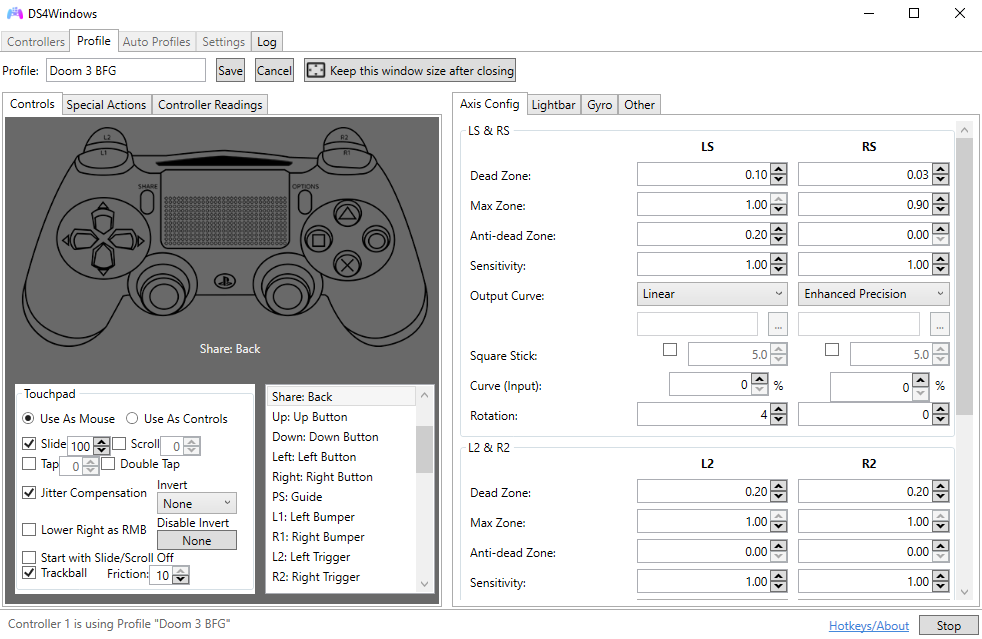
Controller Tab

Controller Management

Real-time controller status and configuration interface.
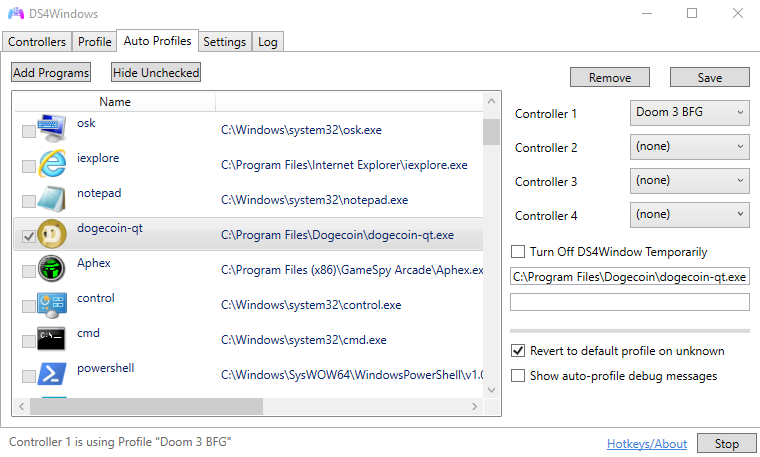
Auto Profiles

Auto Profile Switching

Automatically load profiles based on running applications.
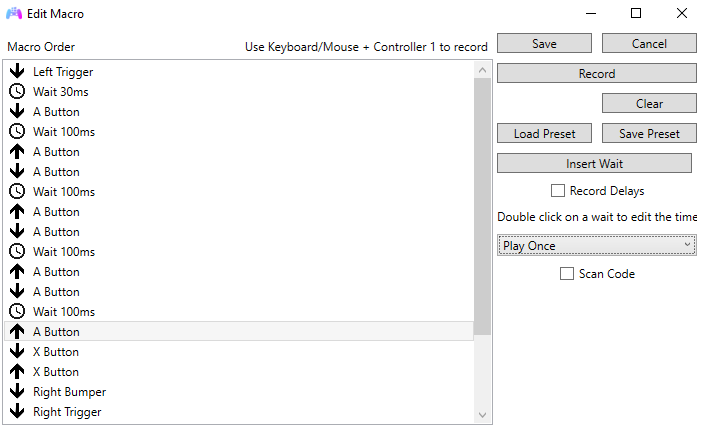
Macros

Macro Editor

Record and edit complex button sequences with timing control.
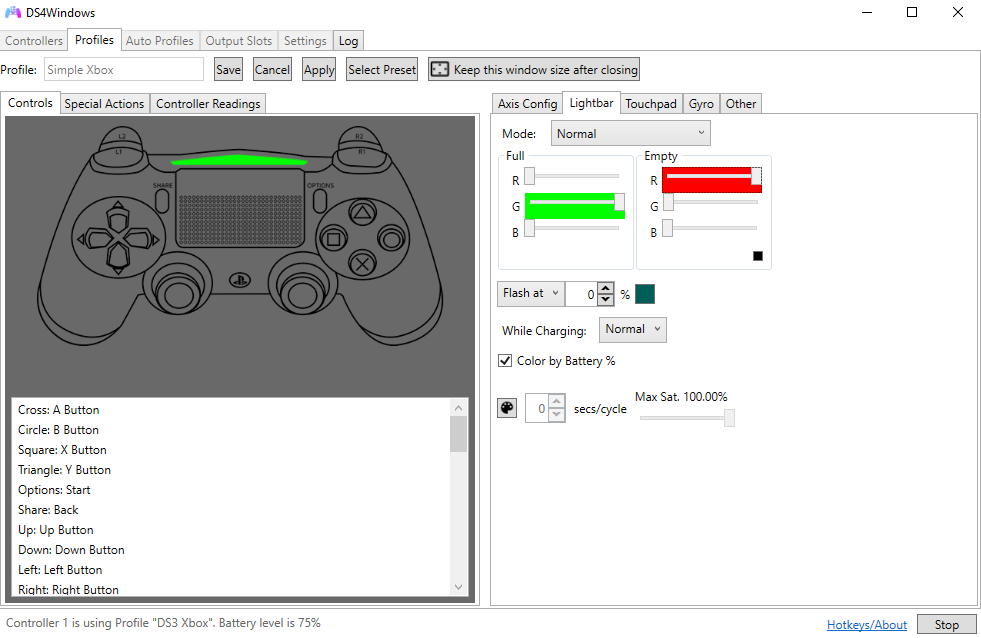
Lightbar Control

Lightbar Customization

Full RGB control with battery-based color transitions.
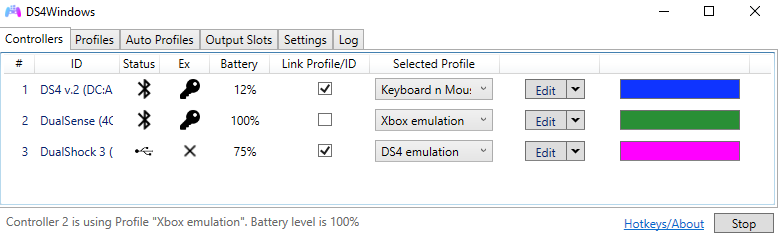
Controller Detection

Multiple Controllers

Support for up to 4 controllers simultaneously.
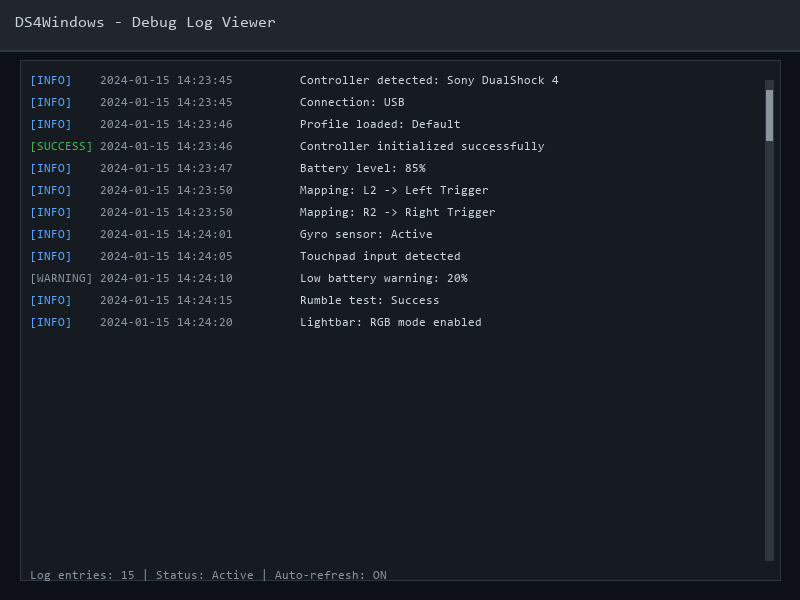
Log Viewer

Debug Logs

Comprehensive logging for troubleshooting connection issues.

Minimum Requirements

  • OS: Windows 7 SP1 or later
  • CPU: Dual-core processor (1.5 GHz or faster)
  • RAM: 2 GB available
  • Storage: 50 MB free space
  • Bluetooth: Optional (for wireless)

Recommended Requirements

  • OS: Windows 10/11 (64-bit)
  • CPU: Quad-core processor (2.0 GHz+)
  • RAM: 4 GB or more
  • Storage: 100 MB free space (SSD recommended)
  • Bluetooth: Bluetooth 4.0+ adapter

Additional Requirements

ViGEmBus Driver - Required for Xbox 360 emulation

USB Port - For wired connection

Admin Rights - For driver installation

Version 3.3.0

January 2024
  • Added DualSense adaptive trigger support
  • Improved Bluetooth stability and connection speed
  • Fixed memory leak in profile switching
  • Updated ViGEmBus driver to latest version
  • Added support for Switch Pro Controller rumble

Version 3.2.8

November 2023
  • New UI theme system
  • Enhanced macro editor with loop support
  • Fixed touchpad sensitivity issues

Version 3.2.5

September 2023
  • Added gyro-to-mouse mapping
  • Profile import/export functionality
  • Improved multi-controller support

Reduce Input Lag

Enable "Exclusive Mode" in Settings > Controllers to reduce input latency by bypassing Windows input processing.

Pro Tip

Monitor Battery Life

Set lightbar colors to change based on battery percentage. Red when low, green when charged.

Pro Tip

Touchpad Precision

Adjust touchpad sensitivity in Settings. Lower sensitivity for precise desktop navigation, higher for gaming.

Pro Tip

Quick Profile Switch

Assign keyboard shortcuts to profiles. Press Ctrl+1, Ctrl+2, etc. to instantly switch between game profiles.

Pro Tip

Multiple Controllers

DS4Windows supports up to 4 controllers. Perfect for local multiplayer sessions with friends.

Pro Tip

Auto-Start with Windows

Enable "Start Minimized" and "Minimize to System Tray" for seamless background operation.

Pro Tip

GitHub

Open-source repository. Report issues, contribute code, or fork the project.

Visit GitHub →

Discord

Join our community Discord server. Get help, share profiles, and connect with other users.

Join Discord →

YouTube

Watch tutorials, setup guides, and advanced configuration videos from the community.

Watch Videos →

Community Resources

Profile Library

Download pre-configured profiles for popular games

Documentation Wiki

Comprehensive guides and troubleshooting articles

Bug Reports

Report issues and help improve DS4Windows

Contributions

Contribute code, translations, or documentation

Intuitive Interface

Clean, modern, and easy to use. DS4Windows gives you powerful tools without the complexity.

Real-time Feedback

See your controller inputs and battery status instantly.

Dark Mode Native

Designed to look great on your gaming setup.

Drag & Drop

Easy profile management and setup.

DS4Windows Interface

How DS4Windows Works

DS4Windows acts as a bridge between your PlayStation or Nintendo controller and Windows, using advanced driver emulation to make your controller appear as an Xbox 360 gamepad to your system. This ensures universal compatibility with virtually all PC games that support gamepad input.

Connect Your Controller

Connect your DualShock 4, DualSense, or Switch Pro controller via USB cable or pair it wirelessly using Bluetooth. DS4Windows automatically detects your controller within seconds.

Automatic Emulation

DS4Windows uses ViGEmBus driver to emulate your controller as an Xbox 360 gamepad. Your PC recognizes it immediately, and games see it as a native Xbox controller.

Start Gaming

Launch any PC game that supports gamepad input. Your controller works immediately with full button mapping, rumble support, and all features enabled.

Compatible with Thousands of Games

DS4Windows works with virtually any PC game that supports Xbox 360 controllers. Thanks to Xbox 360 emulation, your PlayStation or Nintendo controller becomes compatible with the entire Windows gaming ecosystem. From indie games to AAA titles, DS4Windows ensures seamless integration.

Action Games

Call of Duty, Fortnite, Apex Legends, Valorant

RPG Games

Elden Ring, Cyberpunk 2077, The Witcher 3

Racing Games

Forza Horizon, F1, Assetto Corsa

Platformers

Hollow Knight, Celeste, Ori Series

Fighting Games

Street Fighter, Tekken, Mortal Kombat

Sports Games

FIFA, NBA 2K, Rocket League

Works with Steam, Epic Games, GOG, Origin, Uplay, Battle.net, and more

Supported Controllers & Hardware

DS4Windows supports a wide range of gaming controllers, giving you flexibility in choosing your preferred input device for PC gaming. All supported controllers can be used wirelessly via Bluetooth or connected via USB cable for optimal performance.

DualShock 4
DualSense (PS5)
Switch Pro
Joy-Cons

Controller Compatibility Details

DualShock 4 (PS4): Full support for all features including lightbar, touchpad, motion controls, rumble, and battery monitoring. Works with both original and newer models (CUH-ZCT1, CUH-ZCT2).

DualSense (PS5): Complete feature support including adaptive triggers, haptic feedback, touchpad, motion sensors, and LED indicator. Perfect compatibility with all PS5 controller variants.

Nintendo Switch Pro Controller: Full button mapping, rumble support, motion controls, and battery status. Works with both wired and wireless connections.

Joy-Cons: Individual or paired Joy-Con support with separate button mapping and motion controls. Supports both left and right Joy-Cons independently.

Why Choose DS4Windows?

DS4Windows stands out as the premier solution for using PlayStation and Nintendo controllers on Windows PC. Our software offers unmatched features, performance, and reliability compared to other controller emulation tools available.

Completely Free & Open Source

No hidden costs, subscriptions, or premium features. DS4Windows is 100% free and open-source, with source code available on GitHub for transparency and community contributions.

Safe & Secure

Regularly scanned for viruses and malware. No adware, spyware, or unwanted software. DS4Windows is trusted by millions of users worldwide.

Regular Updates

Active development with frequent updates, bug fixes, and new features. Community-driven improvements ensure DS4Windows stays current with latest Windows versions and controller firmware.

Large Community

Join a community of over 2.5 million users. Get help, share profiles, and connect with other gamers on Discord, Reddit, and GitHub.

Advanced Customization

Professional-grade customization options including macro recording, gyro controls, deadzone configuration, and custom sensitivity curves. Create the perfect setup for any game.

Low Latency Performance

Optimized for minimal input lag with direct input handling. Whether using USB or Bluetooth, DS4Windows provides responsive controls perfect for competitive gaming.

Ready to Upgrade Your Gaming?

Join millions of gamers using DS4Windows today. Experience seamless controller support for your PlayStation or Nintendo controllers on Windows PC.

Download DS4Windows v3.3.0 - Completely free, no registration required, ready to use in minutes.

Free & Open Source Virus Free Windows 10/11

Quick Setup Guide

1

Download & Extract

Download the ZIP file and extract it to a folder on your PC. No complex installer needed.

2

Run & Install Drivers

Open DS4Windows.exe. It will prompt you to install the necessary drivers (ViGEmBus) automatically.

3

Connect & Play

Plug in your controller via USB or pair via Bluetooth. It will appear instantly. Start your game!

Technical Specifications & Details

Understanding the technical aspects of DS4Windows helps you make the most of your controller setup. Here's comprehensive information about how the software operates and what it supports.

Connection Methods

  • USB Connection: Direct wired connection provides the lowest latency and most stable connection. Supports USB 2.0 and USB 3.0 ports.
  • Bluetooth Wireless: Full wireless support with Bluetooth 4.0 or higher. Supports multiple controllers simultaneously via Bluetooth.
  • Hybrid Mode: Use USB and Bluetooth controllers simultaneously. Mix different controller types in the same gaming session.

Advanced Features

  • Exclusive Mode: Bypass Windows input processing for lower latency. Requires administrator privileges for optimal performance.
  • Profile System: Create unlimited profiles with different button mappings, deadzones, and settings. Switch profiles instantly via hotkeys.
  • Auto Profile Switching: Automatically load profiles when specific applications or games are launched. Perfect for maintaining different settings per game.

Input Features

  • Button Remapping: Remap any button to any other button, keyboard key, or mouse action. Create complex multi-button combinations.
  • Macro Recording: Record button sequences with precise timing. Execute complex combos with a single button press. Supports loops and conditional logic.
  • Touchpad Control: Use touchpad as mouse cursor, scroll wheel, or map to game controls. Adjustable sensitivity and multi-touch gestures.

Performance Optimization

  • Polling Rate: Adjustable input polling rate up to 1000Hz for ultra-responsive controls in competitive gaming.
  • Deadzone Configuration: Fine-tune analog stick deadzones to eliminate drift and improve precision. Custom deadzone shapes available.
  • Battery Optimization: Monitor battery levels, adjust LED brightness, and configure auto-disconnect settings to extend battery life.

Frequently Asked Questions

Find answers to common questions about DS4Windows installation, configuration, troubleshooting, and usage. Can't find what you're looking for? Check our community forums for more help.